

In our November product update, we made both much easier to capture in Trusty
When someone you love needs answers, two of the first questions are usually the hardest: what did you have, and what did you plan? In our November product update, we made both much easier to capture in Trusty.
You can now upload any existing plan and let Trusty do the reading and filing for you. Adding accounts is faster, and the debts you owe now sit right alongside them. And we're giving you a first look at something many of you have asked for: Trusty in your web browser.
Here's how each one works.
Plans: upload it once, Trusty takes it from there
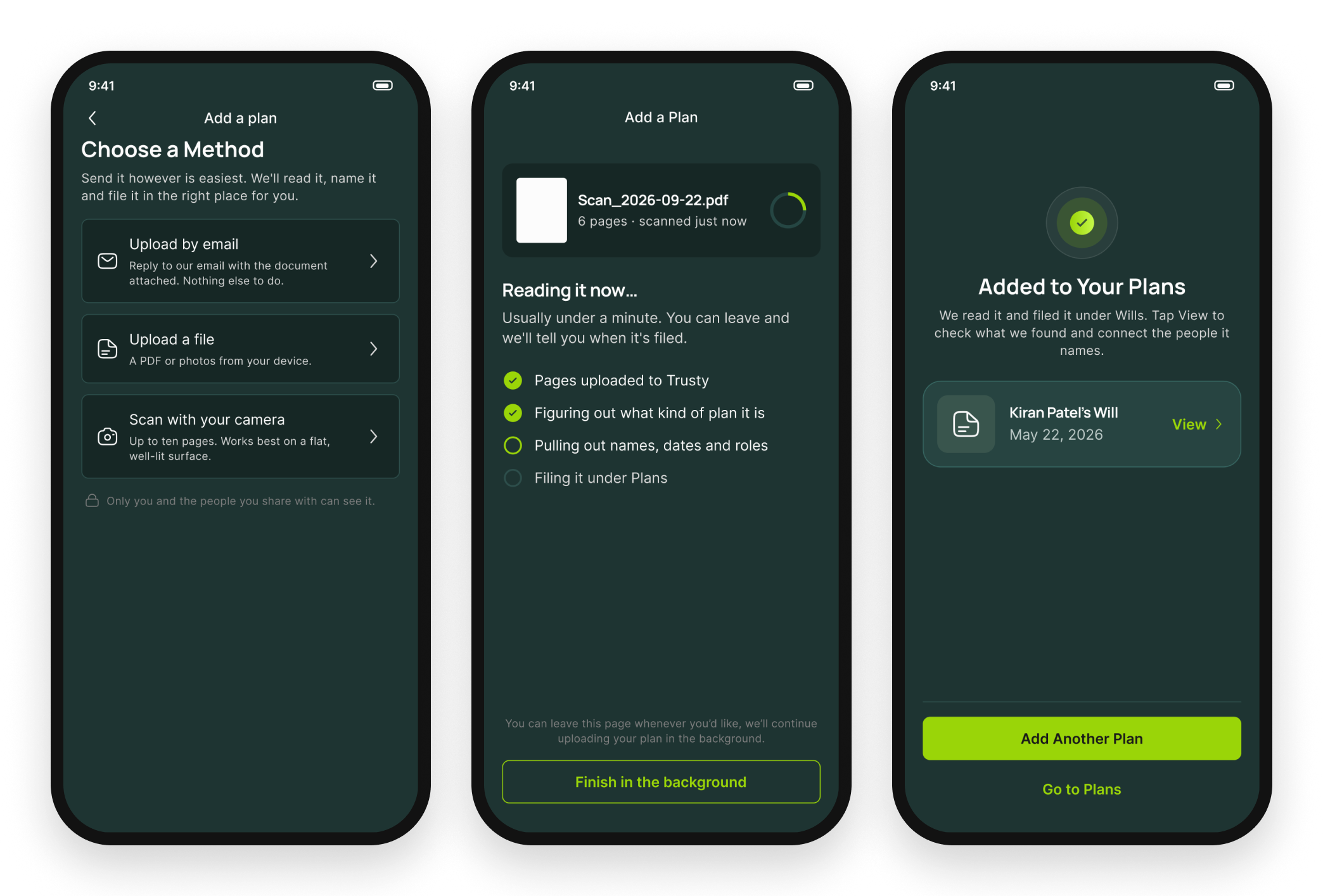
Most families already have something on paper. A will in a drawer, a power of attorney from a few years back, a marriage contract, an insurance policy, maybe a handwritten note that says more than any legal document could. Until now, getting those into Trusty took more effort than it should have. We've rebuilt the plans experience into one simple flow.
Start by adding a plan and choosing how to bring it in. You can reply to a Trusty email with the document attached, upload a PDF or photos from your device, or scan up to ten pages with your phone's camera, handwritten notes included. Trusty supports more than 20 kinds of documents, including wills and codicils, powers of attorney, trust documents, marriage contracts, insurance policies, key tax documents and handwritten notes.
From there, Trusty runs an AI analysis on every document. It works out what kind of plan it is, files it in the right place, pulls out the names, dates and roles inside, and writes a plain-language summary you can come back to anytime. Most documents are done in under a minute. You don't need to wait on the screen, either. Leave whenever you like and we'll let you know when it's filed.
The result is that the people named in your plans show up in Trusty, connected to the documents that mention them, and your family gets a clear explanation of what each plan says rather than a stack of legal language.
Accounts and debts: what you own and what you owe, in one flow
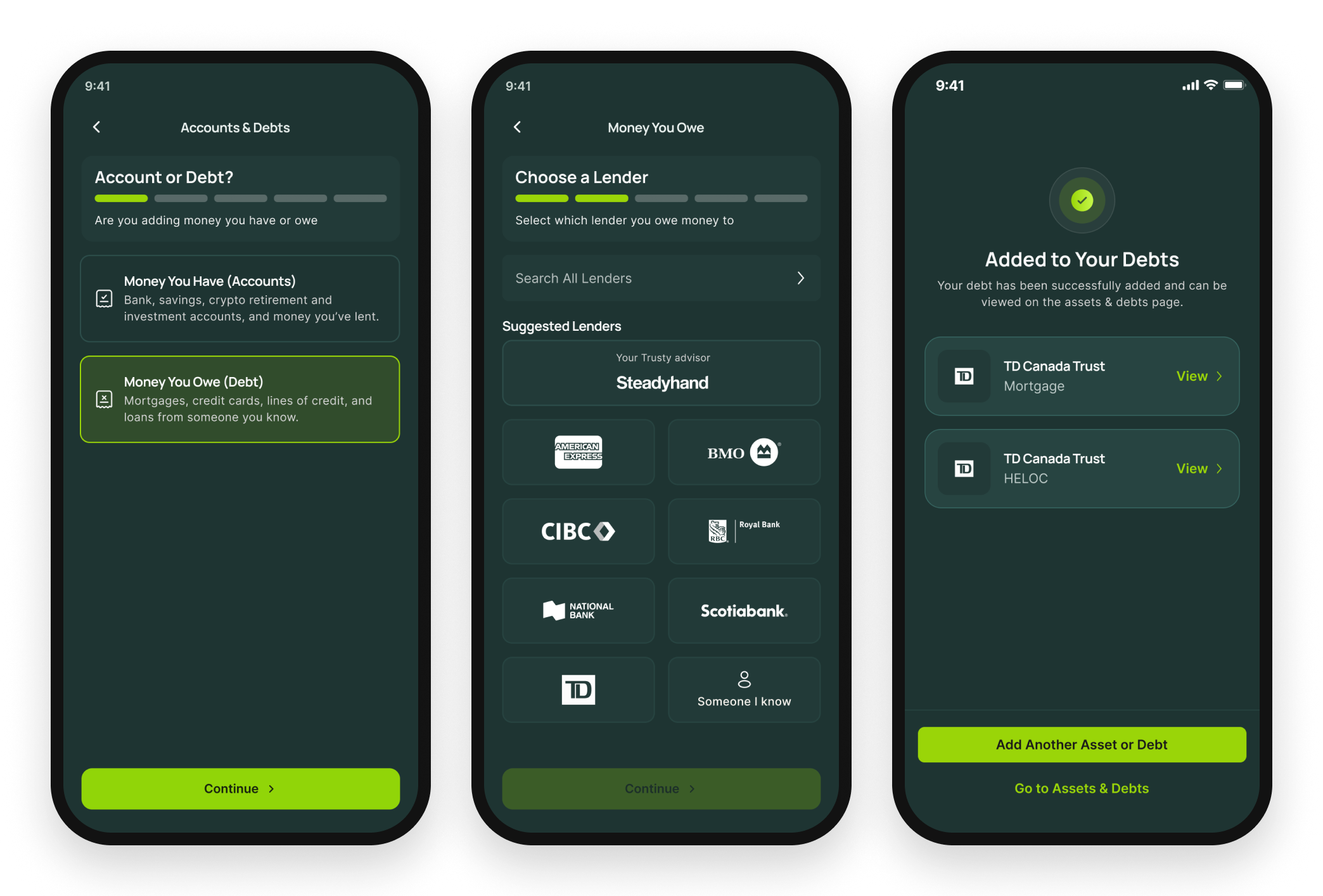
A complete picture of your estate includes both sides of the ledger. Your family needs to know where your accounts are, and they also need to know about the credit card, the mortgage or the line of credit that will have to be settled. We've rebuilt how you add accounts, and debts now live in that same flow.
To add a debt, open Money You Owe and choose your lender. You can search the full list of lenders or pick from suggestions, including the major banks and card issuers, and your own advisor's firm if they work with Trusty. Then add the details you know. You don't need statements or account numbers to get started; a lender and a rough sense of what's owed is already a big help to the people who will one day sort it out.
You can also connect a debt to what it's tied to. Link a mortgage to the home it's on, and anyone looking at that property will see what's still owed against it.
Accounts follow the same quicker steps, so in a few taps your Estate Binder can show what you have and what you owe, side by side.
Coming soon: Trusty in your browser
Not everyone wants to do this kind of work on a phone. Some of you are less comfortable with mobile apps, some just think better on a bigger screen, and some are helping a parent who would rather sit down at the computer.
Soon you'll be able to sign in to Trusty from any computer's web browser, with nothing to download. It's the full Trusty experience, including your Estate Binder, your plans and your accounts, laid out on a larger screen. We'll let you know as soon as it's ready.
Try it today
The best place to start is the plan you already have. Open Trusty, add a plan, and upload a will, a power of attorney or even a handwritten note. Trusty will take it from there.
As always, if you have questions or ideas, reply to any Trusty email or reach us at contact@withtrusty.com. We read every one.